Clipping with multiple boundaries

Here's a neat little trick that can be very useful. Have you ever wanted to clip an object, say a viewport or xref, with more than one boundary? Well there is a way to achieve the result you want, but using a single boundary.
Consider this - you want to clip an object using the outer rectangle below, but you want the inner rectangle to be a hole through the middle. Hmm this is a problem if you can only select one clipping boundary isn't it...
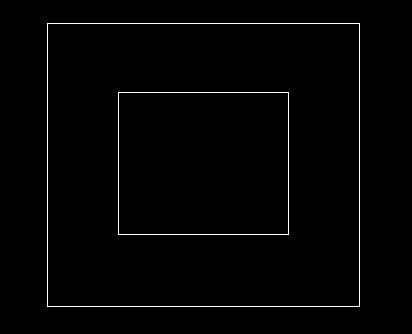
The solution is to make it a single boundary. Draw the outer rectangle, then just draw a line into the new location, draw that boundary, then draw on top of the line you drew to connect to the inner boundary back to the outer boundary and close the polyline:
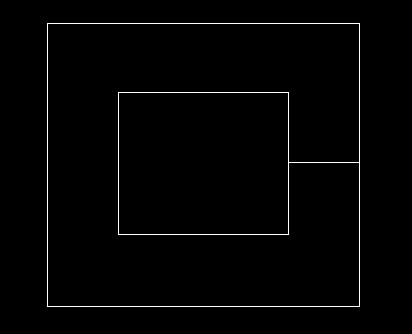
Here's the same thing, but with a slight gap between the overlapping lines so that you can see what I mean:
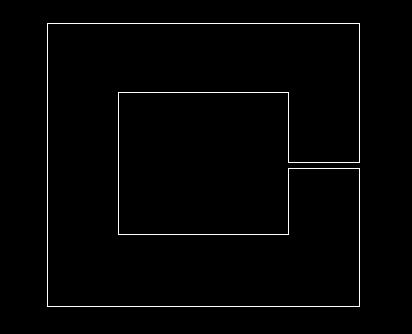
This works with clipping xrefs, blocks, viewports, anything that requires a clipping boundary.
I hope this little tip helps you as much as it has helped me. Also, I'd like to recommend that you subscribe below if you found this useful - I have many more tips to share!
Will
Comments
Bob Dobbs
2012-05-24 17:02:41
"Self-intersecting clip boundaries are not acceptable." according to AutoCAD® 2010
Will
2012-05-25 10:38:38
That's right, hence this post :-)
Trish
2012-11-21 22:38:34
He means your method isn't working for him. It's not working for me either. Great idea but CAD won't let me do it, not even drawing an example just like yours. Map 3D 2012.
Will
2012-11-24 08:40:18
Hmm very odd, I can't see any reason why this wouldn't work. Try drawing the shape with a gap - surely that works?
Mari
2014-11-06 22:02:21
Worked for me fine I forgot about that trick
Thanks
R.K. McSwain
2015-02-23 16:12:31
I have used this on multiple occasions. It works fine, just make sure your boundary does not intersect itself.